
September 18, 2026
Wearables need two pipes: live sync and export import
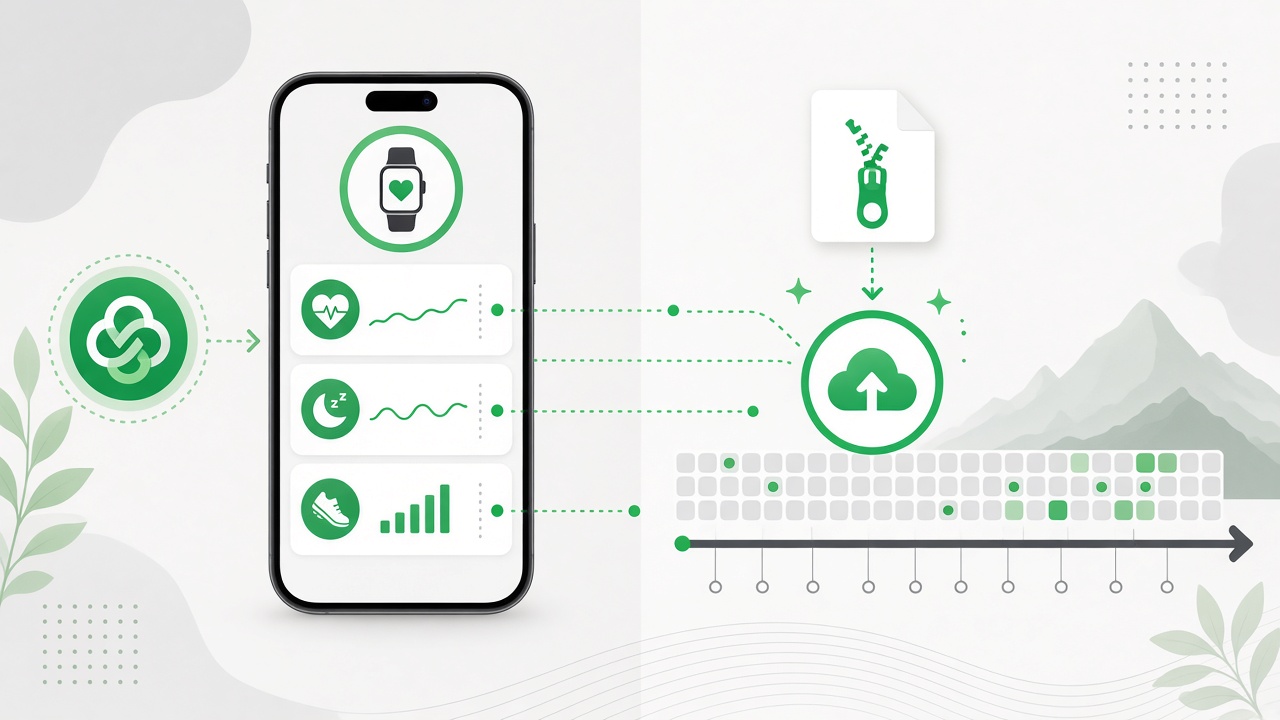
Health Connect keeps today’s samples flowing on Android. Oura export import backfills years of sleep, heart rate, and workouts into the same Health charts.
Wearables are great at capturing your body. They are less great at giving you a calm place to see that data next to mood, meals, todos, and notes.
BigPicture's Health page tries to fix the second part. This week we shipped a piece that fixes the first: how years of ring and watch data actually get into the app.
Two pipes, one chart
We split wearables into two paths on purpose:
Pipe 1: Health Connect (Android, ongoing). When you connect in Settings, BigPicture reads sleep, heart rate, resting HR, HRV, SpO₂, steps, weight, and workouts from whatever apps you already sync into Health Connect. Manual sync pulls recent days. Background sync keeps new samples flowing while you use the app.
Pipe 2: Export import (backfill). For history Health Connect never had, you upload the zip Oura gives you from Account → Privacy → Download data. We parse the CSVs inside, normalize them into the same metric tables the charts use, and tag them as an import batch you can delete later.
Live sync and file import are not competing features. They answer different questions:
- "What did last night look like?" → Health Connect
- "What did the last six months look like before I installed this?" → export import
Trying to solve both with only one pipe either leaves a blank chart on day one or forces you to re-upload a 200 MB zip every week. We would rather be explicit.
What Oura import actually does
In Settings → Wearables → Import, choose your Oura export zip. The app previews record counts and the date span before you commit.
Behind the scenes:
- The server unpacks the zip and finds
App Data/*.csvfiles (Oura nests them at different depths; we match by path, not folder name). - We map sleep stages, daily activity, SpO₂, VO₂ max estimates, heart rate buckets, and workouts into the same
healthMetricsrows Health Connect uses. - Large imports save in chunks (5,000 rows at a time) with progress in the UI. You can cancel mid-import.
- Each run creates an import batch. Delete the batch and those rows go away. Health Connect data is untouched.
Garmin export import is stubbed for now. The UI and ingest path are ready; we are waiting on a stable sample archive to finish the parser.
Why this lives in Settings, not on the Health page
Import is a setup action, not a daily ritual. You do it once (or once a year when Oura refreshes your export), then you live in charts.
The Health page stays focused on the date range at the top: 7 days, 30 days, or a custom window. Wearables tabs show sleep, heart, steps, SpO₂, weight, and workouts for that range. Import batches never clutter the chart toolbar.
What changed on the Workouts tab
While we were in there, we replaced the old 7-day button strip with the same green calendar heatmap the 30-day view uses. Darker green means more qualifying "sweat" minutes that day. Tap a day to see sessions below.
Sweat days are intentionally strict: 20+ minutes and 100+ kcal at roughly 5+ kcal/min when calories exist, with a fallback for sources that omit energy (common on some rings and watches). Easy walks should not paint the whole month green.
Honest limits
- Oura import is file-based today. No Oura API OAuth in the app. You export from Oura Cloud, upload here. That keeps scope small and avoids another token to rotate.
- Health Connect is Android-only for now. iOS HealthKit is on the roadmap; import helps Oura users on any platform get history into charts today.
- Duplicates are deduped by external IDs, but overlapping Health Connect sync and import for the same day may show whichever sample wins the upsert. If you import then sync the same period, prefer one source or delete the import batch.
- Very large exports (tens of thousands of heart rate buckets) take a minute. Progress bar, not a frozen screen.
Where this fits the product
BigPicture is not trying to be a fitness social network or a coaching feed. The bet is the same as the daily brief: your notes, tasks, habits, moods, and body signals in one workspace, so you can notice patterns without exporting CSVs into a spreadsheet every Sunday.
Wearables are one input. Import makes that input honest about history. Health Connect makes it honest about tomorrow.
Try it
- Create an account or explore the demo.
- Open Settings → Wearables, upload an Oura export if you have one, or connect Health Connect on Android.
- Open Health, pick 30 days, and scan sleep beside mood.
If you have years of ring data sitting in a zip, you should see charts fill in within one import, not after months of waiting for sync to backfill.